Cash Application Workflow: Steps, Automation, Exceptions & Best Practices
A cash application workflow is the structured process used to receive customer payments, capture payment and remittance information, identify the correct customer and open invoices, match payments, resolve exceptions, post cash to the accounting system, and reconcile the transaction.
In a manual environment, these activities may require finance teams to work across bank portals, lockboxes, email inboxes, spreadsheets, customer portals, and ERP systems. An automated cash application workflow connects these steps so eligible payments can move from receipt to posting with less manual intervention.
In simple terms: cash application turns money received by a business into accurately updated accounts receivable records.
Cash Application Workflow at a Glance
- Receive customer payment
- Capture payment information
- Collect and extract remittance data
- Identify the customer and open invoices
- Match payment to invoices
- Resolve exceptions and discrepancies
- Post, reconcile, and update accounts receivable
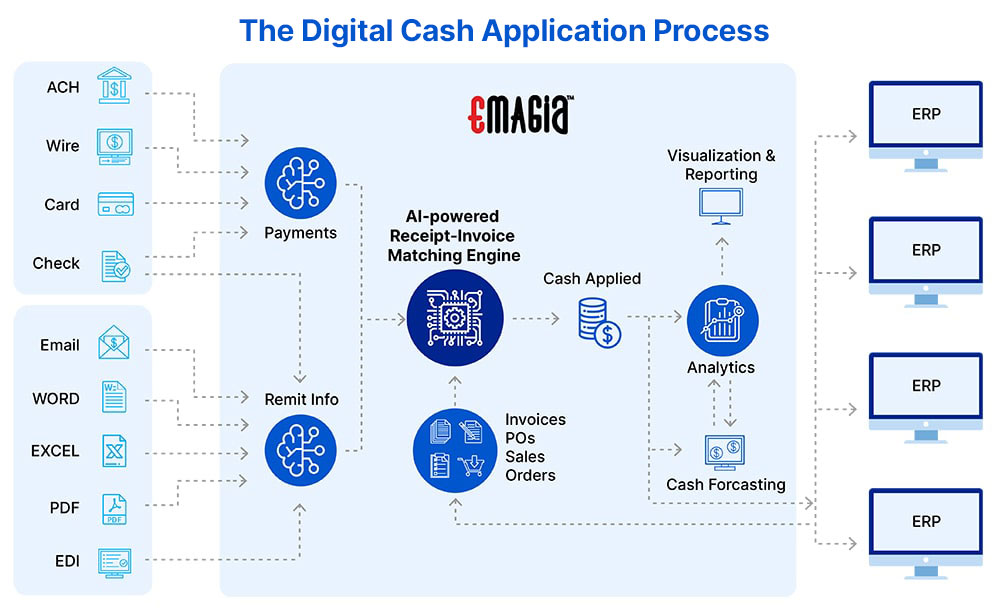
What Is a Cash Application Workflow?
A cash application workflow defines the sequence of activities required to move a customer payment from receipt through accurate application in accounts receivable. The workflow connects payment data, remittance information, customer records, open invoices, matching logic, exception handling, accounting systems, and reconciliation.
The objective is not simply to record that money has arrived. The objective is to determine who paid, what the payment is for, which invoices it settles, whether there are deductions or differences, and how the payment should be recorded in the financial system.
A well-designed workflow helps finance teams maintain accurate customer balances, reduce unapplied cash, accelerate payment posting, improve cash visibility, and provide reliable data for collections and financial reporting.
Why Cash Application Matters in Accounts Receivable
Cash application is an important part of the accounts receivable and order-to-cash lifecycle because it connects incoming customer payments with outstanding receivables.
When payments are not applied promptly, invoices can continue to appear outstanding even after the customer has paid. This can create unnecessary collection activity, inaccurate customer balances, additional reconciliation work, and limited visibility into applied versus unapplied cash.
Efficient cash application therefore supports accurate AR records and gives finance teams a more timely view of receivables and cash.
How Cash Application Fits Into the Order-to-Cash Process
Cash application occurs after a customer makes a payment and is closely connected with collections, deductions, reconciliation, credit management, and other accounts receivable activities.
While collections focuses on obtaining payment from customers, cash application focuses on accurately allocating payments that have already been received to the appropriate customer accounts and invoices.
Cash Application Workflow: 7 Key Steps
Although workflows vary by organization, payment method, ERP, geography, and transaction complexity, a modern cash application process generally follows seven core stages.
1. Receive the Customer Payment
The workflow begins when a customer payment reaches the company’s bank account, lockbox, payment platform, or other approved payment channel.
Payments may arrive through:
- ACH and other electronic bank transfers
- Wire transfers
- Checks and lockbox services
- Credit and debit card payments
- Electronic payment platforms
- Customer payment portals
- Other regional payment methods
The payment record may contain information such as the payer name, amount, currency, value date, bank reference, account information, and transaction identifier.
2. Capture Payment Data
Payment information must be captured and made available to the cash application process. In a manual workflow, analysts may download bank files or access multiple banking platforms.
Automated workflows can connect directly with banking systems, lockboxes, payment platforms, and other sources to consolidate payment information.
The objective is to create a reliable payment record that can be associated with customer and remittance information.
3. Capture and Extract Remittance Information
Remittance advice tells the receiving company what a customer payment is intended to settle. It may contain invoice numbers, amounts, deductions, credit references, purchase orders, customer identifiers, and other payment instructions.
Remittance information may arrive separately from the payment through:
- Email messages and attachments
- PDF documents
- Excel or CSV files
- EDI files
- Customer portals
- Bank and lockbox files
- Payment platforms
- Check remittance documents
Digital extraction tools reduce manual data entry by converting information from emails, documents, and other sources into structured data that can be used for payment matching.
OCR, intelligent document processing, machine learning, and AI can be used to interpret both structured and unstructured remittance information.
4. Identify the Customer and Open Invoices
Before a payment can be applied, the workflow must determine which customer account is associated with the payment and identify the relevant open receivables.
Customer identification can use information such as:
- Payer name
- Bank account information
- Customer account number
- Invoice references
- Purchase order numbers
- Payment references
- Historical payment patterns
- Remittance information
Once the customer is identified, the workflow can retrieve relevant open invoices from the ERP or accounts receivable system.
5. Match the Payment to Invoices
Payment matching is the core activity in cash application. The workflow compares payment information and remittance details with open invoices to determine how the money should be allocated.
Simple transactions may involve a one-to-one match between a payment and an invoice. More complex transactions may involve multiple invoices, partial payments, deductions, overpayments, consolidated payments, or incomplete remittance information.
Common matching scenarios include:
- One-to-one matching: One payment matches one invoice.
- One-to-many matching: One payment covers multiple invoices.
- Many-to-one matching: Multiple payments are associated with one receivable.
- Partial payment: The payment is less than the invoice balance.
- Overpayment: The payment exceeds the amount due.
- Short payment: The customer pays less than the expected amount, potentially because of a deduction or dispute.
- Consolidated payment: One payment covers invoices across multiple transactions or entities.
Automated cash posting and ERP cash application processes can use predefined rules, historical information, and intelligent matching to automate eligible transactions.
6. Resolve Cash Application Exceptions
Not every payment can be matched automatically. Exceptions occur when payment information is incomplete, inconsistent, ambiguous, or different from the open receivable balance.
Common exceptions include:
- Missing remittance advice
- Unknown customer
- Missing invoice number
- Partial payments
- Short payments
- Overpayments
- Deductions
- Currency differences
- Duplicate or unusual payments
- Payments covering multiple invoices
A modern exception workflow should identify the reason for the exception, provide relevant payment and customer information, assign the transaction to the appropriate reviewer, and record the resolution.
This allows finance teams to focus human attention on transactions that genuinely require judgment rather than manually reviewing every payment.
7. Post, Reconcile, and Update Accounts Receivable
After a payment has been matched and approved, it can be posted to the appropriate customer account and invoices in the ERP or accounting system.
Posting updates the receivable balances and payment status. Reconciliation then compares the relevant bank, payment, and accounting records to confirm that transactions are complete and accurate.
In an automated environment, qualified payments can move through matching, posting, and reconciliation with minimal manual intervention, while exceptions remain available for review.
Manual vs. Automated Cash Application Workflow
The difference between manual and automated cash application is primarily the amount of repetitive work performed by people versus software and intelligent automation.
| Workflow Stage | Manual Process | Automated Process |
|---|---|---|
| Payment intake | Analysts collect files from banks and other sources | Payment data is collected through integrations |
| Remittance capture | Analysts search email, portals and documents | Software captures and extracts remittance information |
| Customer identification | Manual research and lookup | Automated identification using available payment data |
| Invoice matching | Manual searches and rule-based lookup | Rules, algorithms, ML and AI can propose or perform matches |
| Exceptions | Manual investigation and routing | Exceptions are identified, prioritized and routed |
| Posting | Manual ERP entry or upload | Qualified applications can be posted electronically |
| Reconciliation | Manual comparison of records | Automated reconciliation and exception identification |
Manual cash application can become increasingly difficult as payment volumes, customers, entities, currencies, payment channels, and remittance formats grow.
Cash Application Automation: How It Works
Cash application automation uses software to automate repetitive activities involved in receiving, interpreting, matching, posting, and reconciling customer payments.
A modern automated workflow typically connects:
- Banking systems
- Lockbox services
- Payment platforms
- Email inboxes
- Customer portals
- Remittance documents
- ERP and accounting systems
- Accounts receivable data
Cash application automation replaces repetitive tasks with intelligent workflows that can reduce manual processing and provide a more consistent way to manage payment transactions.
Benefits of Automating Cash Application
- Faster payment posting
- Less repetitive manual work
- Improved payment-to-invoice matching
- Reduced unapplied cash
- Faster exception identification
- Better visibility into cash application performance
- Improved auditability and process consistency
- More scalable AR operations
How AI Changes the Cash Application Workflow
Traditional automation works well when payment data follows predictable rules. AI can extend automation by interpreting less-structured information and identifying patterns across historical transactions.
AI-powered cash application can support activities such as:
- Extracting information from unstructured remittance documents
- Identifying customers from payment information
- Recognizing payment and remittance patterns
- Predicting likely invoice matches
- Handling complex payment allocations
- Supporting exception investigation
- Prioritizing transactions for human review
- Learning from historical application decisions
The objective is not to eliminate financial controls or human oversight. Instead, AI can automate routine transactions while directing ambiguous or higher-risk transactions to finance professionals.
Rules-Based Matching vs. AI-Based Matching
| Capability | Rules-Based Automation | AI-Enabled Automation |
|---|---|---|
| Structured payment references | Strong | Strong |
| Predictable customer patterns | Strong | Strong |
| Unstructured remittance | Limited | Stronger |
| Changing document formats | May require configuration | Can interpret varied information |
| Historical pattern recognition | Limited | Can use historical data |
| Complex exceptions | Usually routed for review | Can provide recommendations or supporting context |
Cash Application Exception Handling
Exception management is one of the most important components of a scalable cash application workflow. Automation should not simply identify unmatched payments; it should help finance teams understand why a transaction failed to match and what information may be required to resolve it.
Common Cash Application Exceptions
- Missing remittance: Payment is received without sufficient information to determine the invoices being paid.
- Short payment: The amount received is lower than the amount expected.
- Deduction: A customer reduces the payment because of a claimed allowance, dispute, return, pricing issue, or other reason.
- Overpayment: The payment exceeds the amount due.
- Unknown payer: The organization cannot confidently identify the customer.
- Multiple invoices: One payment needs to be allocated across several open invoices.
- Currency difference: Payment and receivable information involve different currencies or exchange-rate considerations.
How Automated Exception Routing Works
An intelligent workflow can classify an exception, collect related payment and customer information, assign the case to the appropriate team, and track the resolution.
This creates a human-in-the-loop model: routine payments are automated, while transactions requiring judgment are presented to finance professionals with relevant context.
Cash Application Workflow KPIs
Automation should be measured through operational and financial process metrics rather than automation claims alone.
| KPI | What It Measures |
|---|---|
| Auto-match rate | Percentage of payments automatically matched to receivables |
| STP rate | Percentage of eligible payments processed without manual intervention |
| Unapplied cash | Value or volume of received payments that remain unapplied |
| Posting time | Time between payment receipt and posting |
| Exception rate | Percentage of transactions requiring additional investigation |
| Exception resolution time | Average time required to resolve exceptions |
| Manual touches per payment | Amount of human effort required per transaction |
| Matching accuracy | Accuracy of automated payment-to-invoice matches |
| Reconciliation differences | Transactions requiring reconciliation or correction |
Tracking these metrics gives finance leaders a clearer view of whether cash application automation is actually reducing manual work and improving process performance.
ERP, Bank, and Lockbox Integration
Cash application becomes significantly more scalable when payment sources and financial systems are connected rather than managed as separate processes.
Bank integration for cash application can help move payment information into the cash application workflow, while ERP integration allows approved applications to flow back into accounts receivable records.
Why ERP Integration Matters
ERP integration can reduce duplicate data entry and help ensure that payment applications are reflected consistently in customer accounts and financial records.
Depending on the organization, the workflow may need to support multiple ERP instances, entities, currencies, countries, banks, and lockboxes.
Supporting Lockbox Processing
Lockbox services can help businesses collect customer payments and associated payment information through banking partners. An automated cash application workflow can consume lockbox information together with other payment and remittance sources.
The result is a more connected process from payment receipt to application and reconciliation.
How Cash Application Supports DSO and Working Capital
Efficient cash application supports timely and accurate AR information, which can help collections teams distinguish between genuinely outstanding invoices and payments that have already been received.
Efficient cash application directly supports faster collections by ensuring customer payment activity is reflected accurately in accounts receivable.
Does Cash Application Reduce DSO?
Cash application can support DSO management by helping payments move through the AR process promptly and keeping customer balances current. However, cash application is only one factor affecting DSO.
DSO is also influenced by credit policies, invoice accuracy, payment terms, collections effectiveness, disputes, deductions, customer payment behavior, and other parts of the order-to-cash cycle.
Therefore, the strongest business case for cash application automation should consider its impact on posting speed, unapplied cash, collections productivity, AR visibility, reconciliation effort, and working capital—not DSO alone.
Cash Application Best Practices
A scalable cash application workflow should combine process standardization, appropriate automation, strong controls, and continuous measurement.
1. Standardize the Workflow
Document how different payment types, currencies, entities, customers, and exceptions should be handled. Standardization creates a foundation for automation and consistent execution.
2. Improve Remittance Data Quality
Encourage customers and payment partners to provide complete invoice references and structured remittance information. Better source data reduces downstream matching effort.
3. Centralize Payment and Remittance Information
Reduce the need for analysts to search multiple systems by consolidating payment and remittance data into a controlled workflow.
4. Automate High-Volume, Repeatable Transactions
Start with transaction types that have predictable matching patterns and measurable manual effort. Expand automation as confidence and process maturity increase.
5. Create a Structured Exception Process
Define exception categories, ownership, escalation rules, approval requirements, and resolution procedures.
6. Measure STP and Unapplied Cash
Monitor automation performance through KPIs such as straight-through processing, auto-match rate, exception volume, posting time, and unapplied cash.
7. Maintain Human Oversight and Controls
Automation should operate within defined business rules, approval policies, access controls, and audit requirements. Transactions that require judgment should remain subject to appropriate review.
Security, Controls, and Auditability
Cash application involves financial transactions and customer information, so automation should be implemented with appropriate security and financial controls.
Important Controls
- Role-based access
- Segregation of duties
- Approval workflows
- Transaction-level audit trails
- Exception tracking
- Controlled ERP posting
- Data validation
- Monitoring and reporting
Digital audit trails can provide visibility into how a payment was matched, what rules or recommendations were used, who reviewed an exception, and when the transaction was posted.
Industry Use Cases for Advanced Cash Application Workflows
Cash application workflows become particularly valuable when businesses manage high payment volumes, multiple entities, complex remittance formats, or global payment environments.
Enterprise and Shared Services
Centralized cash application can help global finance organizations standardize payment processing while supporting different banks, currencies, payment methods, ERPs, and regional requirements.
Manufacturing and Distribution
Organizations receiving consolidated payments, deductions, partial payments, and complex remittance information can use automation to reduce the manual effort involved in payment allocation and exception processing.
SaaS and High-Volume Digital Businesses
Businesses with large numbers of electronic payments can use automated matching and ERP integration to process transactions at scale and maintain current customer balances.
Growing and Mid-Market Businesses
Automation can help growing businesses handle increasing payment volumes without relying entirely on proportional increases in manual processing capacity.
How Emagia Transforms the Cash Application Workflow
Emagia delivers an AI-powered cash application platform designed to automate key stages of the cash application workflow, including payment and remittance capture, invoice matching, exception handling, and ERP posting.
Automated remittance capture helps bring payment information from multiple sources into the cash application process. Intelligent matching can then identify relationships between incoming payments and open receivables, while exceptions can be routed for review when additional human judgment is required.
Emagia’s cash application capabilities are designed for complex enterprise environments involving multiple payment sources, ERPs, currencies, languages, and lockboxes. Its product information describes integrations with 170+ banks across 90 countries and reports vendor-specific automation and matching metrics; these figures should be understood as Emagia-reported product capabilities rather than universal industry benchmarks. :chatgpt-content-reference{index=”2″}
The broader objective is to move cash application from a manual transaction-processing activity toward a more intelligent, scalable, and measurable AR workflow.
Frequently Asked Questions About Cash Application Workflow
What is a cash application workflow?
A cash application workflow defines the steps used to receive payments, capture payment and remittance information, identify customers and invoices, match payments, resolve exceptions, post transactions, and reconcile accounts receivable records.
What are the main steps in the cash application process?
The main steps are receiving the payment, capturing payment data, collecting remittance information, identifying the customer and open invoices, matching the payment, resolving exceptions, posting the transaction, and reconciling the records.
How does cash application automation work?
Cash application automation connects payment sources, remittance data, customer records, open invoices, matching logic, exception workflows, and ERP posting. Software can automate eligible transactions while routing unmatched or ambiguous payments to finance professionals.
Why is invoice matching important in cash application?
Invoice matching determines which open invoices or receivable balances a customer payment should settle. Accurate matching keeps customer balances current, reduces unnecessary exceptions, and supports reliable accounts receivable reporting.
What is unapplied cash?
Unapplied cash is money that a company has received but has not yet successfully matched to the appropriate customer account, invoice, or receivable item. Common causes include missing remittance information, unknown payers, incorrect references, partial payments, and deductions.
How does AI improve cash application?
AI can help interpret unstructured remittance information, recognize historical payment patterns, identify potential invoice matches, and support exception handling. This can reduce repetitive manual work while keeping transactions that require judgment in a human review workflow.
What role does OCR play in cash application?
OCR can extract information from documents such as payment stubs, PDFs, and other remittance materials. When combined with intelligent document processing and other automation technologies, extracted information can be converted into structured data for matching.
What is straight-through processing in cash application?
Straight-through processing, or STP, is the percentage of eligible payments that move through the cash application workflow without manual intervention. It is commonly used as a KPI for evaluating automation effectiveness.
Does cash application reduce DSO?
Efficient cash application can support DSO management by ensuring payments are posted promptly and customer balances remain current. However, DSO is influenced by many other factors, including payment behavior, credit, invoicing, collections, disputes, and payment terms.
Can cash application integrate with ERP systems?
Yes. Modern cash application solutions can integrate payment and remittance information with ERP and accounting systems so that approved payment applications can be posted and reflected in accounts receivable records.
What is the difference between cash application and reconciliation?
Cash application determines how a received customer payment should be allocated to invoices or receivable balances. Reconciliation compares records from different sources to confirm that transactions and balances agree.
What are the most important cash application KPIs?
Common KPIs include auto-match rate, straight-through processing rate, unapplied cash, posting time, exception rate, exception resolution time, manual touches per payment, matching accuracy, and reconciliation differences.
Cash Application Workflow Related Resources
Webinar
A Step-by-Step Guide to Achieving Digital World Class Efficiency in Cash Application Using AI
Webinar
Reduce Lockbox Fees with Remittance Data Capture AI
Webinar
Reducing Complexity of Cash Application in Europe with AI
Ebook
Lockbox and Remittance Data Extraction with AI
Ebook
Top Financial Use Cases for Intelligent Document Processing
Blog
What is DSO, what does it indicate, and how to calculate it?


